EN
EN



Why port labels beat a single wattage number
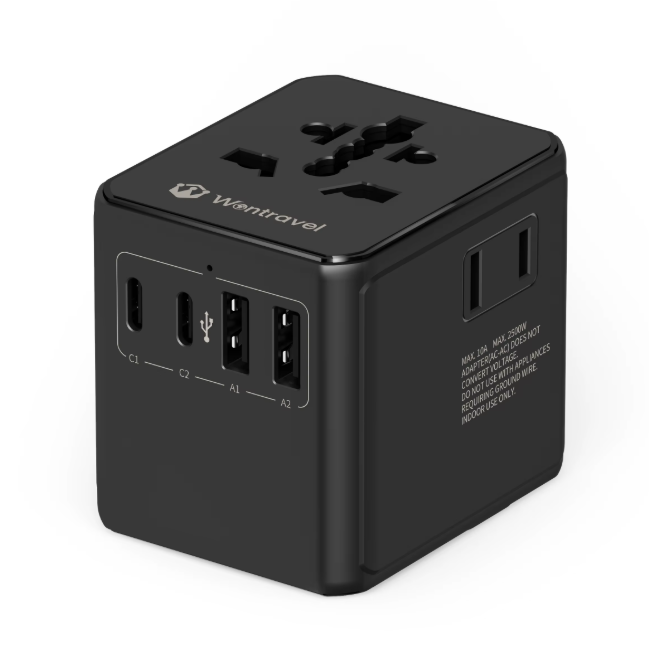
A charger shell can claim 100 W while one port delivers 18 W and another delivers 65 W. That mismatch is common in travel gear. A usb travel adapter often carries several ports with different profiles, and the total wattage printed on the case says little about which device gets what. The useful number is the per-port rating, especially for USB-C Power Delivery. A phone may request 9 V at 2 A, a tablet may ask for 15 V at 2 A, and a laptop may negotiate 20 V at 3.25 A. Those are different contracts even when one adapter serves all three.
Charging slow often gets blamed on the cable or the device. Port assignment is just as likely to be the cause. Plugging a laptop into a USB-A port that tops out at 12 W will not end well if the laptop expects 45 W or more. The adapter is not broken. It is being asked to do a job outside its port map.
What happens during the USB Power Delivery handshake
USB Power Delivery is a negotiation protocol, not a simple pipe. The USB Implementers Forum maintains the specification, and USB PD 3.1 extends the range to 240 W over USB-C. In a travel adapter, the handshake usually happens in milliseconds. The adapter advertises available power profiles, the device picks one, and both sides confirm voltage and current. If a second device joins, the adapter can rebalance.
Safety is covered by standards such as IEC 62368-1, which sets requirements for audio, video, information, and communication technology equipment. That standard matters because a travel adapter packs switching electronics, isolation, and thermal management into a small body. A port that runs warm under load is not automatically dangerous, but a port that runs hot with no device attached deserves attention.
Matching device classes to the right port
Different devices want different power profiles. The table below is a practical starting point, not a universal rule.
|
Device type |
Typical charging request |
Port to use |
Common mistake |
|
Phone or earbuds |
5 V to 9 V, 10 W to 20 W |
USB-C PD or USB-A |
Using a laptop port that shares power |
|
Tablet |
9 V to 15 V, 18 W to 30 W |
USB-C PD |
Assuming any USB-C port is fast |
|
Thin laptop |
20 V, 45 W to 65 W |
USB-C PD, highest output |
Using a hub that splits power |
|
Camera or drone battery |
5 V to 12 V, 10 W to 30 W |
USB-C PD or dedicated charger |
Charging through a low-power USB-A port |
|
Smartwatch |
5 V, under 10 W |
Any USB port |
Leaving it on a high-power port all night |
The last row is not a safety warning. It is a reminder that a high-power port may not be the best fit for a small battery. Some devices manage their own intake, but cheap gadgets sometimes do not.
Shared power is not a defect, it is a budget
A multi-port USB travel adapter has a power budget. When one port is active, the laptop may receive 65 W. When three ports are active, the same laptop may drop to 45 W while a phone takes 18 W and a watch takes 5 W. That redistribution is normal. The adapter is not failing. It is staying inside its thermal and electrical limits.
The practical effect shows up in timing. A laptop that charges from empty in two hours on a dedicated brick may take three hours on a shared adapter. For overnight charging, that difference rarely matters. For a short airport layover, it does. The fix is not a bigger adapter. The fix is matching the device to the port that matters most at that moment.
A field case from a rail maintenance crew
In 2022, a rail maintenance crew working in a mountainous region of southwest China carried two laptops, four handheld testers, three phones, and a drone for track inspection. The first setup used individual wall chargers. The hotel room had two usable outlets, so charging ran in shifts. One laptop stayed on a low-power USB-A port for most of the night and gained only 30 percent.
The crew switched to two multi-port travel adapters with labeled USB-C PD ports. The laptops moved to the 65 W ports. Phones and testers went to the remaining ports. The drone battery stayed on a dedicated charger because its manual called for a specific voltage curve. The change did not make every device charge at full speed. It made the priority clear, and the morning routine stopped depending on who woke up first.
Checks that separate a useful adapter from a paper spec
Spec sheets reward careful reading. A few checks can prevent a bad purchase.
- Look for per-port output, not just total wattage. A 100 W label can mean 100 W shared across four ports.
- Confirm USB-C PD support on the ports that will serve a laptop. USB-A ports rarely deliver more than 12 W.
- Check the plug mechanism. A universal plug body should lock firmly and feel solid in the hand.
- Match the adapter to the largest device in the bag, then treat extra ports as convenience.
- Read the standards references. IEC 62368-1 and USB PD listings are more useful than decorative badges.
A travel adapter cannot fix a device that demands a proprietary charger. Some camera batteries, medical devices, and high-power gaming laptops still need their own power supply. For everyone else, the right port map turns a single adapter into a practical charging station.
Wontravel has been building travel charging products since 2008, with in-house mold design, injection molding, assembly, and quality control. That manufacturing depth helps keep port layouts, plug standards, and inspection routines consistent across a product line, which matters when a travel adapter has to work in many outlets and many time zones.